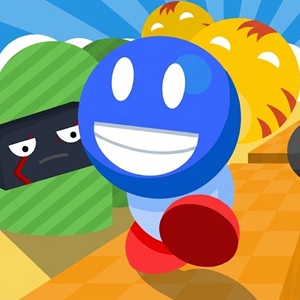
Gravity Run challenges your reflexes as you flip upside down, dodge sharp spikes, and grab stars in a fast-paced physics platformer. Are you ready?
About Gravity Run
Running upside down on the ceiling changes everything you know about platformers. Gravity Run takes simple runner mechanics and flips them completely on their head. You control a cheerful blue character sprinting through dangerous levels filled with hazards. Instead of jumping over pits, you tap the screen or click your mouse to invert gravity instantly. One second you are sprinting along the floor. The next second you are running across the roof to clear a deadly bed of spikes.
If you enjoy fast-paced reflex challenges like Run 3 or classic arcade runners, this game will test your focus immediately. The momentum keeps building as you advance. You cannot slow down, so your hands must keep up with your eyes.
Guide to Master Gravity Run
Controls
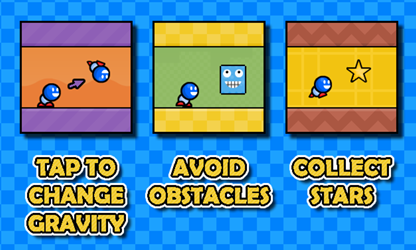
- Click or Tap on Screen: Tap anywhere to switch gravity between the floor and the ceiling instantly.
Objectives
- Flip Gravity: Switch your orientation to avoid hitting hazards on the ground or top wall.
- Avoid Hazards: Stay away from sharp spikes sticking out from the floor, ceiling overhangs, and blocky enemies like grinning blue cubes or flying skulls.
- Collect Stars: Grab yellow stars placed along dangerous routes to achieve a 3-star rating on every level.
- Reach the Finish Line: Cross the checkered flag banner to unlock the next level.
Tips to Handle the Hardest Levels in Gravity Run
Having spent hours playing endless skill-based web games, I found that Gravity Run demands a slightly different mindset from typical jump-and-run titles. In standard platform games, you jump early to clear wide gaps. Here, jumping early often sends you headfirst into ceiling spikes.
- Do not lock your eyes on the blue runner. Keep your vision centered near the right edge of the screen so you can prepare for incoming spike traps.
- Wait until the very last fraction of a second before flipping. Inverting gravity too early often launches you directly into overhead obstacles.
- Trying to grab every star while learning a new stage usually leads to quick failure. Finish the level first to learn the layout, then replay it to collect all three stars.
- The distance between floor spikes and ceiling traps follows a distinct rhythm. Keep a steady mental beat to avoid panic tapping.
Is Gravity Run Worth Playing?
Fans who frequently browse our collection of Running Games will find a fresh spin on classic runner mechanics here. Many arcade titles rely on pure speed. Gravity Run focuses on spatial awareness and fast decisions. The progress bar at the top of the screen lets you track your exact distance to the checkered flag, adding great tension as you near the end.
The visual style is vibrant and clean, featuring soft desert hills in the background, sharp geometric hazards, and clear audio cues. Whether you have two minutes to spare or want to master every stage, it offers quick restart loops that keep you coming back for one more try.
Frequently Asked Questions
Can you play Gravity Run on mobile devices?
- Yes. The touch controls allow you to tap the screen to flip gravity smoothly on both phones and tablets.
Does Gravity Run require an internet connection after loading?
- No. Once the game fully loads in your browser tab, you can continue playing even if your connection drops.
Are there multiple levels to unlock in Gravity Run?
- Yes. The game features multiple distinct levels with increasing difficulty and unique star placements to unlock.